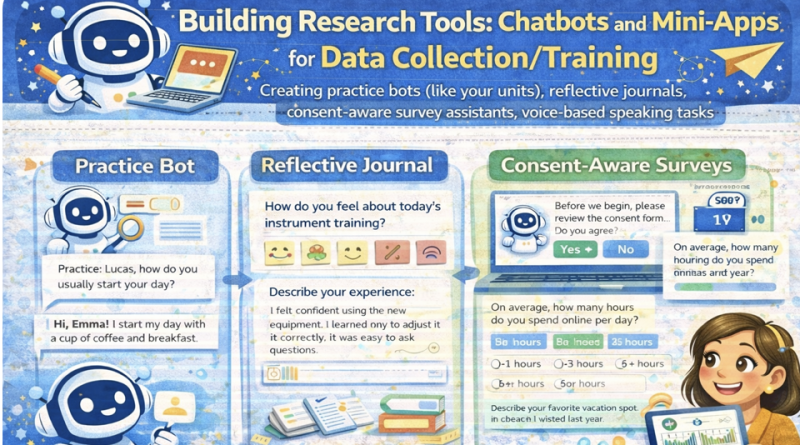
Building Research Tools: Chatbots & Mini-Apps for Data Collection/Training

Building Research Tools: Chatbots & Mini-Apps for Data Collection/Training
Create practice bots, reflective journals, consent-aware survey assistants, and voice-based speaking tasks. This lesson emphasizes ethics, participant consent, and clean data logging for research.
Mic: Off
Tip: For best voice options, use Chrome/Edge. If voices don’t appear yet, click once on the page and wait 2–3 seconds.
1) Outcomes
By the end, you can…
- Design a practice chatbot for training (e.g., speaking prompts, feedback, repetition).
- Build a reflective journal mini-app with structured prompts and exportable logs.
- Create a consent-aware survey assistant that collects minimal data ethically.
- Implement voice-based tasks (record + playback + transcript note fields) for speaking research.
- Generate research-friendly outputs: timestamps, anonymized IDs, and CSV export.
Ethics & data rules
- Consent first: do not collect any data until consent is explicitly given.
- Data minimization: collect only what you need for the study.
- No names: use participant IDs (e.g., P001) and de-identify content.
- Transparency: display what is collected and allow export/delete.
- Local-first: store logs in browser (localStorage) unless you have approved secure storage.
Research control: The tool scaffolds learning/data collection; the researcher controls consent, prompts, and analysis decisions.
2) Conversation (Tool Design Coach)
Practice tool design decisions: goal → data → consent → tasks → logging → export → safety.
Tip: Good research tools produce clean, structured data and a clear consent trail.
3) Reading + Comprehension Quiz
Reading: Turning teaching mini-apps into research tools
1 Many classroom mini-apps can become research tools if they produce structured logs.
For example, a speaking practice bot can record prompts, learner responses, timestamps, and self-ratings.
A reflective journal can capture weekly reflections with consistent prompts, improving comparability.
2 Research tools must be consent-aware. A safe workflow is: show information sheet → ask for consent →
only then enable data logging. Participants should be able to stop, export, or delete their data.
Collect only what you need (data minimization) and avoid identifiable information.
3 For voice-based tasks, a research-friendly design separates learning from collection:
the tool can provide prompts and let learners record and replay audio.
If transcription is used, it should be disclosed and learners should understand what is stored.
4 Clean data design improves analysis. Use participant IDs, consistent task IDs, and predefined fields.
Save data in simple formats (CSV/JSON) and keep an audit trail (tool version, prompt version, timestamp).
5 Researcher control remains essential: the tool scaffolds training, but the researcher defines constructs,
validates measures, and interprets results ethically.
Comprehension check (choose the best answer)
4) Toolbox (Consent, logging, export, task design)
Consent flow (minimum viable)
Clean data logging schema
Reflective journal prompts (templates)
Voice speaking task templates
Export & deletion checklist (participant rights)
5) Prompts + Examples (Copy & Adapt)
These prompts help you design tasks and data fields without collecting sensitive information.
Prompt 1 — Design a practice bot unit + log fields
Prompt 2 — Consent-aware survey assistant script
Prompt 3 — Reflective journal scaffolds
Prompt 4 — Voice task rubric + self-rating
Mini example (expected output style)
6) Listening (Two Google Voices) — “Consent before collection”
Listen to two instructors discussing how to build consent-aware mini-apps for research.
7) Build Lab — Generate a Mini-Tool (Consent + Logging + Export)
This mini-tool includes:
(1) Consent gate, (2) Participant ID, (3) Task runner (practice bot + journal + survey assistant),
(4) Voice task recorder, and (5) Data export.
Logs are stored locally in your browser. For real studies, use approved secure storage and ethics clearance.
Logs are stored locally in your browser. For real studies, use approved secure storage and ethics clearance.
A) Consent gate (must complete before logging)
Tip: Use codes like P001, P002 (no real names).
Logging: Off (no consent)
B) Choose a mini-tool
Tip: You can run multiple modes; logs capture mode + task ID.
C) Task settings
D) Interaction
Participant response
Voice: use Start Voice and speak; it will fill the active field.
Optional self-ratings (0–10)
E) Voice task (record + playback) — optional
This records audio in-browser. It stores only a local playback URL in the log. For real research storage, use approved secure systems.
Recorder: idle
F) Local log viewer
8) Problem-solving
Scenario: You built a speaking practice bot that logs student audio and reflections.
Your ethics committee asks: “How do you ensure consent, privacy, and participant control?”
Your task:
Your task:
- Write a consent workflow (4–6 steps) that prevents accidental logging.
- List 3 data-minimization decisions (what you will NOT collect).
- Propose 2 participant control features (export/delete/stop).
- Write a short transparency statement for the method section (4–6 lines).
A) Consent workflow (4–6 steps)
B) Data minimization (3 bullets)
C) Participant control features (2 bullets)
D) Transparency statement (4–6 lines)
Progress
0
Activities completed
0%
Average score
0
Checklist items used
Saved locally in your browser (local storage).