AI basicsAI for teachers

AI Basics for Teachers

AI Basics for Teachers

Understand what AI can/can’t do, explore common tools (chatbots, translation, voice), and apply classroom-safe use. Includes a two-speaker Google Voices listening dialogue.

Mic: Off
Tip: In Chrome/Edge you often see “Google …” voices. If you don’t see voices yet, click once on the page and wait 2–3 seconds.

1) Conversation (Voice Interactive)

Speak or type your answers. The goal is to explain AI in teacher-friendly language, identify safe classroom use, and avoid over-trusting AI.

Target moves: define AI simply, give 1 classroom example, name 1 risk (hallucination/bias/privacy), and a safety rule.

2) AI Concepts (Reading + Comprehension + Examples)

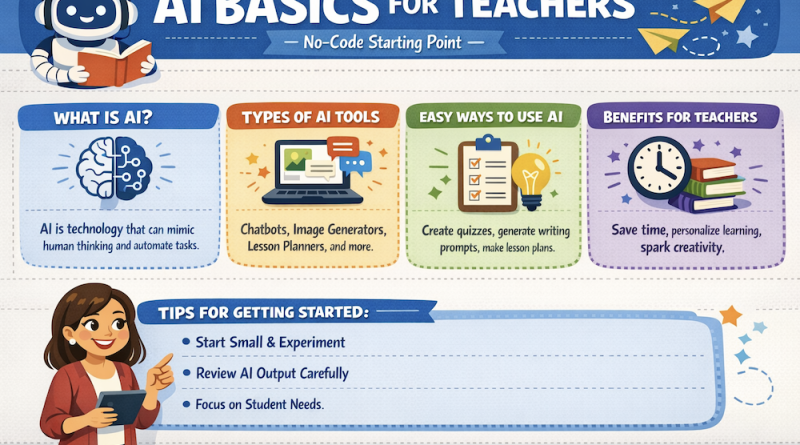
Simple definition: AI tools predict likely text/audio/images from patterns in data. They can be helpful, but they can also be wrong.
Reading: AI basics for teachers
1 Many teachers use AI tools to save time, but it is important to understand what AI is doing. Most modern AI tools do not “think” like humans. They generate responses by predicting what is likely to come next, based on patterns from large amounts of training data.
2 AI can be very useful for low-risk tasks. For example, it can draft a lesson plan, create example sentences, suggest discussion questions, summarize a text, or help you rewrite instructions in simpler language. These are good starting points, especially for busy teachers.
3 However, AI can also make mistakes. It may “hallucinate,” meaning it can produce information that sounds confident but is not true. It can also show bias, repeat stereotypes, or give unsafe suggestions if prompts are unclear. Teachers should not assume AI output is correct without checking.
4 Classroom-safe use means teachers set rules. A basic rule is: do not share personal student data. Another rule is: verify important facts and references using trusted sources. When AI is used for assessment, teachers should ask students to show their process (drafts, notes, reflections) to reduce overreliance.
5 The best mindset is: AI is a helpful assistant, not the teacher. It can help you prepare materials and support learning, but professional judgment belongs to teachers. Good practice is to be transparent with students about how AI is allowed and how it is not allowed.

Comprehension check (choose the best answer)

Examples (copy & adapt)

Example 1 — Safe lesson-plan prompt (no-code)

            
Example 2 — Speaking practice prompt (CEFR + constraints)

            
Example 3 — Student AI-use policy (short)

            
Example 4 — Fact-check rule for teachers

            
Bad → Better prompt (safer + clearer)


3) Common AI Tools (No-code)

Match tool types to classroom uses.

A) Matching

B) Use it (Best tool)

4) Classroom-safe Use (Checklist)

Tick what you will do in your classroom. This creates a “safe-use contract” you can copy into your syllabus.

Simple rule: AI can help you draft and brainstorm, but you verify facts, sources, and final decisions.

5) Listening (Two Google Voices) — “AI in a real classroom”

Click Play dialogue. Listen and choose the best answers. (The voices will alternate automatically: Speaker A then Speaker B.)

6) Mini Tasks (Do this tomorrow)

7) Using AI to support teacher research (Responsible workflow)

Choose the safest research workflow actions.

Progress

0
Activities completed
0%
Average score
0
Key moves used
Completion is saved in your browser (local storage). If you change device/browser, progress resets.

Key Moves Bank

Leave a Reply

Your email address will not be published. Required fields are marked *